Hopimg for Codex
Describe an image or edit one you already have. Use your Hopimg image key and save the results directly to your local project.
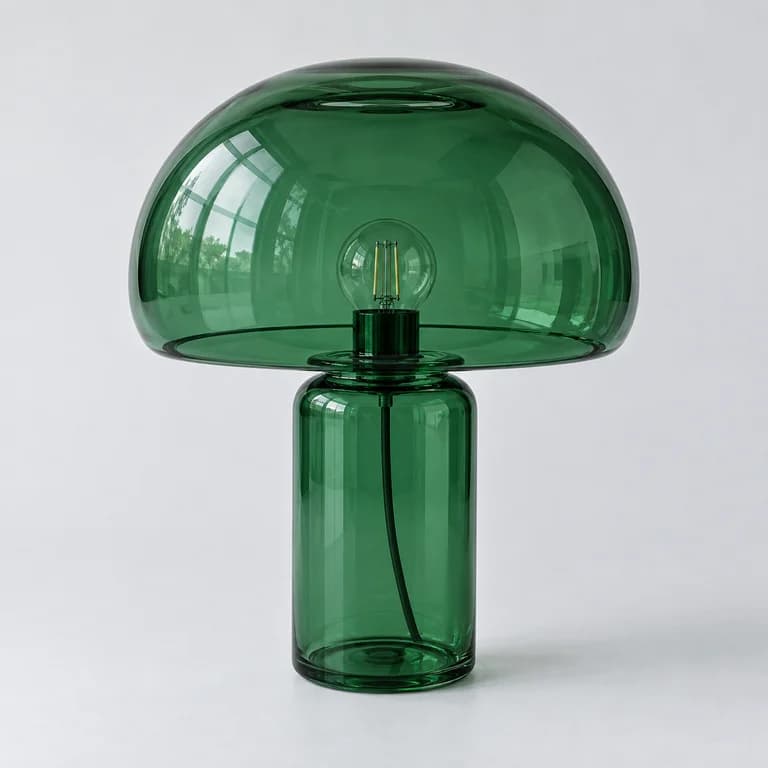
Generated with the plugin
A green glass lamp, pale gray background, soft daylight.
gpt-image-2 · PNG
Install & configure
You need a Codex CLI with plugin support, Python 3.10+, and a funded Hopimg image API key. The download includes an installer and needs no additional Python packages.
Check Python 3.10+ and Codex CLI. Update the CLI if the plugin command is missing.
python3 --version
codex plugin --helpnpm install -g @openai/codexExtract and install
These commands expect the ZIP in Downloads. Adjust that path if needed. Keep the extracted folder for future updates. Updating replaces the plugin files in that folder.
mkdir -p "$HOME/hopimg-plugins"
unzip -o "$HOME/Downloads/hopimg-codex-1.0.1.zip" -d "$HOME/hopimg-plugins"
cd "$HOME/hopimg-plugins/hopimg-codex"
python3 install.py
Configure your image API key
Run in the same terminal. Paste your key at the hidden prompt and press Enter. It is stored in your user directory. Status checks configuration without a billable request.
python3 plugins/hopimg/skills/hopimg/scripts/hopimg.py configure
python3 plugins/hopimg/skills/hopimg/scripts/hopimg.py status
codex plugin list
After installation, start a new Codex chat. Select the Hopimg skill or explicitly ask to use Hopimg.
Text to image
Send this request in a new chat. Codex calls Hopimg, saves the image, and returns a local preview.
Use Hopimg to generate a green glass table lamp,
pale gray background, soft daylight, 1024x1024.
Save it to output/hopimg in this project and show the image.
Image to image
Place the source image in your project and provide its actual path and your edits. Replace input.png below with your own image path.
Use Hopimg to edit ./input.png:
Keep the green glass lamp's shape and angle, change the background to pale blue.
Save to output/hopimg, preserve the source, and show the edited image.
The image is sent directly to Hopimg. Both generation and editing use your account balance; check usage for actual charges. Pricing
Troubleshooting
Can I generate images concurrently?
Hopimg has upstream concurrency limits. The plugin defaults to one image and allows one active request per local user across Codex sessions. A second request reports that it is busy before calling the API, without retrying. Other devices or clients can still use upstream capacity.
The plugin does not appear in Codex
Run codex plugin list to confirm installation, then start a new chat. Select Hopimg in the skill picker or explicitly ask to use Hopimg. Restart the desktop app if the plugin directory has not refreshed. Existing chats do not load new skills automatically.
Where does my API key go?
The plugin has no bundled credentials, and this page does not collect keys. Configure stores your key in ~/.config/hopimg/credentials.json with owner-only permissions on macOS/Linux and inherited user-directory permissions on Windows. The client sends the key, prompts and input images directly to api.hopimg.com. HOPIMG_API_KEY takes precedence over the credential file.
HTTP 401, 403, or 429
401: run configure with a valid key. 403: check image permissions and account balance. 429: wait before trying again. The image key is independent of your Codex model provider credentials.
HTTP 400 or application/octet-stream during editing?
This indicates an upload format problem. The current plugin detects the actual image bytes and sets the correct PNG, JPEG or WebP MIME type automatically. Update the plugin and start a new chat. If it persists, confirm that Codex is using the Hopimg skill with a valid image. Fix the upload before resubmitting. Direct API clients must set image/png, image/jpeg or image/webp on the image part.
Are HTTP 502 responses retried?
Yes. Both generation and editing retry up to twice after 2 and 4 seconds (3 requests total), with all attempts kept serial. Use --retries 1 for one retry or --retries 0 to disable. If it still fails, check service status and usage before trying again. Retries may incur additional charges; usage records show actual billing.
Are timed-out requests retried?
No. Each attempt has a default timeout of 240 seconds, so an operation with 502 retries can take longer. Generation can take tens of seconds or longer. The upstream may already have generated and billed for a timed-out request, so check usage before trying again. Follow Codex's network approval flow if its sandbox blocks the request.
Where are images saved? Which options are supported?
Images default to output/hopimg in your project, with absolute file paths returned in Codex. PNG/JPEG/WebP inputs up to the plugin's 50 MiB limit, batches of 1–10, and sizes 1024x1024, 1024x1536, 1536x1024 or auto are supported. Existing images are never overwritten.
How do I update or uninstall?
Download a new release, extract it, run install.py and start a new chat. Uninstall with codex plugin remove hopimg@hopimg. Generated images and credentials remain. To clear credentials, separately delete ~/.config/hopimg/credentials.json and unset HOPIMG_API_KEY if configured.